
GITLAB_AI_CATALOGgitlab-mcp
Rank
83
A Model Context Protocol (MCP) server for GitLab
Traction
No public download signal
Freshness
Updated 2d ago
MCP

Crawler Summary
Adnify - A lightweight yet powerful AI-powered code editor Adnify **中文** | $1 **Connect AI to Your Code.** 一个拥有极致视觉体验、深度集成 AI Agent 的下一代代码编辑器。 Adnify 不仅仅是一个编辑器,它是你的**智能编程伴侣**。它复刻并超越了传统 IDE 的体验,融合了 Cyberpunk 玻璃拟态设计风格,内置强大的 AI Agent,支持从代码生成到文件操作的全流程自动化。 <!-- 主界面截图 --> --- 联系与交流 欢迎加入交流群,一起讨论 Adnify 的使用和开发! | 微信群 | QQ 群 | 作者微信 | |:---:|:---:|:---:| | | | | | 扫码加入微信群 | QQ群号: 1076926858 | 微信号: adnaan_worker | 💡 如有问题或建议,也可以直接在 $1 或$1 提交 --- 📋 **$1** --- 目录 - $1 - $1 - $1 - $1 - $ Published capability contract available. No trust telemetry is available yet. 136 GitHub stars reported by the source. Last updated 2/24/2026.
Freshness
Last checked 2/22/2026
Best For
Contract is available with explicit auth and schema references.
Not Ideal For
adnify is not ideal for teams that need stronger public trust telemetry, lower setup complexity, or more explicit contract coverage before production rollout.
Evidence Sources Checked
editorial-content, capability-contract, runtime-metrics, public facts pack
Adnify - A lightweight yet powerful AI-powered code editor Adnify **中文** | $1 **Connect AI to Your Code.** 一个拥有极致视觉体验、深度集成 AI Agent 的下一代代码编辑器。 Adnify 不仅仅是一个编辑器,它是你的**智能编程伴侣**。它复刻并超越了传统 IDE 的体验,融合了 Cyberpunk 玻璃拟态设计风格,内置强大的 AI Agent,支持从代码生成到文件操作的全流程自动化。 <!-- 主界面截图 --> --- 联系与交流 欢迎加入交流群,一起讨论 Adnify 的使用和开发! | 微信群 | QQ 群 | 作者微信 | |:---:|:---:|:---:| | | | | | 扫码加入微信群 | QQ群号: 1076926858 | 微信号: adnaan_worker | 💡 如有问题或建议,也可以直接在 $1 或$1 提交 --- 📋 **$1** --- 目录 - $1 - $1 - $1 - $1 - $
Public facts
7
Change events
1
Artifacts
0
Freshness
Feb 22, 2026
Published capability contract available. No trust telemetry is available yet. 136 GitHub stars reported by the source. Last updated 2/24/2026.
Trust score
Unknown
Compatibility
MCP
Freshness
Feb 22, 2026
Vendor
Adnaan Worker
Artifacts
0
Benchmarks
0
Last release
1.6.14
Key links, install path, and a quick operational read before the deeper crawl record.
Summary
Published capability contract available. No trust telemetry is available yet. 136 GitHub stars reported by the source. Last updated 2/24/2026.
Setup snapshot
git clone https://github.com/adnaan-worker/adnify.gitSetup complexity is MEDIUM. Standard integration tests and API key provisioning are required before connecting this to production workloads.
Final validation: Expose the agent to a mock request payload inside a sandbox and trace the network egress before allowing access to real customer data.
Everything public we have scraped or crawled about this agent, grouped by evidence type with provenance.
Vendor
Adnaan Worker
Protocol compatibility
MCP
Auth modes
mcp, api_key, oauth
Machine-readable schemas
OpenAPI or schema references published
Adoption signal
136 GitHub stars
Handshake status
UNKNOWN
Crawlable docs
6 indexed pages on the official domain
Merged public release, docs, artifact, benchmark, pricing, and trust refresh events.
Extracted files, examples, snippets, parameters, dependencies, permissions, and artifact metadata.
Extracted files
0
Examples
4
Snippets
0
Languages
typescript
mermaid
graph TB
    subgraph "用户界面层 UI Layer"
        UI[React Components]
        Monaco[Monaco Editor]
        XTerm[XTerm Terminal]
        ChatUI[Chat Panel]
    end

    subgraph "渲染进程 Renderer Process"
        subgraph "AI Agent 核心"
            AgentCore[Agent Core]
            EventBus[Event Bus]
            ToolRegistry[Tool Registry]
            ToolExecutors[Tool Executors]
        end

        subgraph "状态管理"
            AgentStore[Agent Store]
            EditorStore[Editor Store]
            UIStore[UI Store]
        end

        subgraph "前端服务"
            TermMgr[Terminal Manager]
            LSPClient[LSP Client]
            WorkspaceMgr[Workspace Manager]
            CompletionSvc[Completion Service]
        end

        subgraph "Agent 子系统"
            Context[Context Manager]
            Compression[Compression Manager]
            Memory[Memory Service]
            Session[Session Service]
            Emotion[Emotion System]
        end

        subgraph "Web Workers 线程池"
            ComputeWorker[Compute Worker Pool]
            MonacoWorkers[Monaco Language Workers]
            TSWorker[TypeScript Worker]
            JSONWorker[JSON Worker]
            CSSWorker[CSS Worker]
            HTMLWorker[HTML Worker]
        end
    end

    subgraph "IPC 通信层 IPC Bridge"
        IPC[Type-Safe IPC Handlers]
    end

    subgraph "主进程 Main Process"
        subgraph "安全层"
            Security[Security Module]
            FileWatcher[File Watcher]
            AuditLog[Audit Logger]
        end

        subgraph "核心服务"
            LSPMgr[LSP Manager]
            IndexSvc[Indexing Service]
            MCPMgr[MCP Manager]
            LLMProxy[LLM Proxy]
        end

        subgraph "索引系统"
            Chunker[Code Chunker]
            Embedder[Embedder]
            VectorDB[(LanceDB)]
        end

        subgraph "Node.js Worker Threads"
            IndexWorker[Indexer Worker]
        end

        subg
bash
# 1. 克隆项目
git clone https://gitee.com/adnaan/adnify.git
cd adnify

# 2. 安装依赖
npm install

# 3. 启动开发服务器
npm run dev
bash
# 1. 生成图标资源 (首次运行或图标变更时)
node scripts/generate-icons.js

# 2. 构建安装包
npm run dist

# 生成的文件位于 release/ 目录
text
adnify/
├── resources/           # 图标资源
├── scripts/             # 构建脚本
├── src/
│   ├── main/            # Electron 主进程
│   │   ├── ipc/         # IPC 处理器
│   │   │   ├── http.ts      # HTTP 请求
│   │   │   ├── indexing.ts  # 代码索引
│   │   │   ├── llm.ts       # LLM 通信
│   │   │   ├── lsp.ts       # LSP 服务
│   │   │   ├── search.ts    # 搜索功能
│   │   │   └── settings.ts  # 设置管理
│   │   ├── indexing/    # 代码库索引服务
│   │   │   ├── chunker.ts       # 代码分块
│   │   │   ├── embedder.ts      # Embedding 生成
│   │   │   ├── indexService.ts  # 索引服务
│   │   │   └── vectorStore.ts   # 向量存储
│   │   ├── services/llm/# LLM 通信层
│   │   └── security/    # 安全模块
│   │       ├── securityModule.ts    # 安全管理器
│   │       ├── secureTerminal.ts    # 终端安全
│   │       └── workspaceHandlers.ts # 工作区处理
│   ├── renderer/        # 前端渲染进程
│   │   ├── agent/       # AI Agent 核心
│   │   │   ├── llm/     # LLM 客户端适配器
│   │   │   ├── tools/   # 工具定义与执行
│   │   │   ├── services/# Agent 服务
│   │   │   └── prompts/ # 提示词模板
│   │   ├── components/  # UI 组件
│   │   │   ├── agent/   # Agent 相关组件
│   │   │   │   ├── ChatPanel.tsx      # 对话面板
│   │   │   │   ├── ToolCallCard.tsx   # 工具调用卡片
│   │   │   │   ├── InlineDiffPreview.tsx # Diff 预览
│   │   │   │   └── PlanPreview.tsx    # 计划预览
│   │   │   ├── editor/  # 编辑器组件
│   │   │   │   ├── Editor.tsx         # Monaco 编辑器
│   │   │   │   ├── DiffViewer.tsx     # Diff 查看器
│   │   │   │   └── InlineEdit.tsx     # 内联编辑
│   │   │   ├── sidebar/ # 侧边栏组件
│   │   │   │   └── panels/
│   │   │   │       ├── ExplorerView.tsx  # 文件浏览器
│   │   │   │       ├── SearchView.tsx    # 搜索面板
│   │   │   │       ├── GitView.tsx       # Git 面板
│   │   │   │       ├── OutlineView.tsx   # 大纲视图
│   │   │   │       └── ProblemsView.tsx  # 问题面板
│   │   │   ├── panels/  # 底部面板
│   │   │   │   ├── TerminalPanel.tsx  # 终端面板
│   │   │   │   ├── SessionList.tsx    # 会话列表
│   │   │   │   └── CheckpointPanel.tsx# 检查点面板
│   │   │   ├── dialogs/ # 对话框
│   │   │   │   ├── CommandPalette.tsx # 命令面板
│
Full documentation captured from public sources, including the complete README when available.
Docs source
GITHUB MCP
Editorial quality
ready
Adnify - A lightweight yet powerful AI-powered code editor Adnify **中文** | $1 **Connect AI to Your Code.** 一个拥有极致视觉体验、深度集成 AI Agent 的下一代代码编辑器。 Adnify 不仅仅是一个编辑器,它是你的**智能编程伴侣**。它复刻并超越了传统 IDE 的体验,融合了 Cyberpunk 玻璃拟态设计风格,内置强大的 AI Agent,支持从代码生成到文件操作的全流程自动化。 <!-- 主界面截图 --> --- 联系与交流 欢迎加入交流群,一起讨论 Adnify 的使用和开发! | 微信群 | QQ 群 | 作者微信 | |:---:|:---:|:---:| | | | | | 扫码加入微信群 | QQ群号: 1076926858 | 微信号: adnaan_worker | 💡 如有问题或建议,也可以直接在 $1 或$1 提交 --- 📋 **$1** --- 目录 - $1 - $1 - $1 - $1 - $
中文 | English
Connect AI to Your Code. 一个拥有极致视觉体验、深度集成 AI Agent 的下一代代码编辑器。



Adnify 不仅仅是一个编辑器,它是你的智能编程伴侣。它复刻并超越了传统 IDE 的体验,融合了 Cyberpunk 玻璃拟态设计风格,内置强大的 AI Agent,支持从代码生成到文件操作的全流程自动化。
<!-- 主界面截图 -->
欢迎加入交流群,一起讨论 Adnify 的使用和开发!
| 微信群 | QQ 群 | 作者微信 |
|:---:|:---:|:---:|
|  |
|  |
|  |
| 扫码加入微信群 | QQ群号:
|
| 扫码加入微信群 | QQ群号: 1076926858 | 微信号: adnaan_worker |
💡 如有问题或建议,也可以直接在 Gitee Issues 或Github Issues 提交
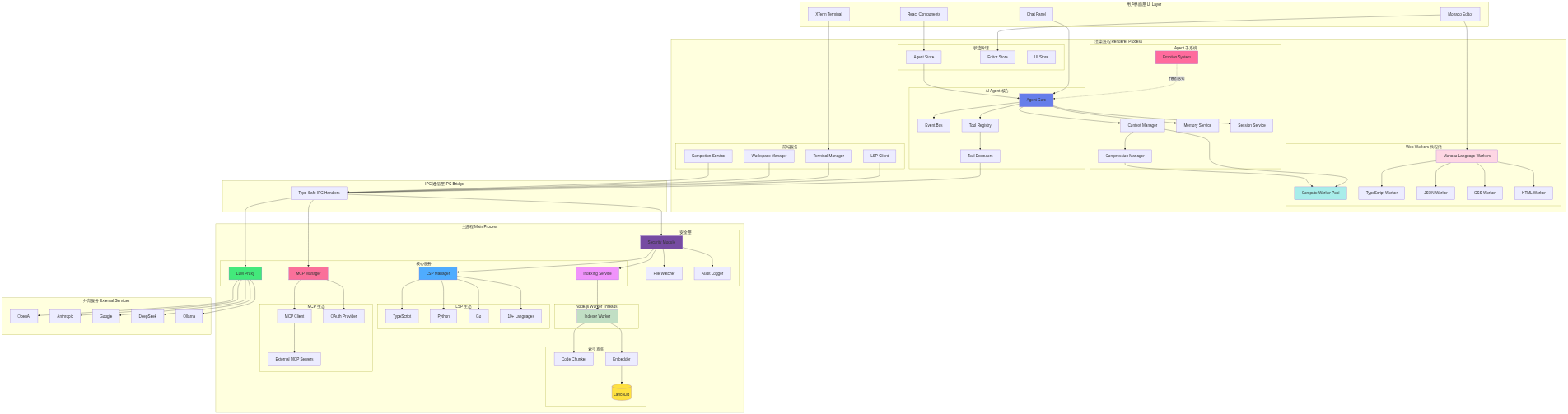
Adnify 采用 Electron 多进程架构,结合 Web Worker 和 Node.js Worker Threads 实现高性能并发处理。
<div align="center"> <!-- 架构图 - 使用 Mermaid.ink 在线渲染 -->graph TB
subgraph "用户界面层 UI Layer"
UI[React Components]
Monaco[Monaco Editor]
XTerm[XTerm Terminal]
ChatUI[Chat Panel]
end
subgraph "渲染进程 Renderer Process"
subgraph "AI Agent 核心"
AgentCore[Agent Core]
EventBus[Event Bus]
ToolRegistry[Tool Registry]
ToolExecutors[Tool Executors]
end
subgraph "状态管理"
AgentStore[Agent Store]
EditorStore[Editor Store]
UIStore[UI Store]
end
subgraph "前端服务"
TermMgr[Terminal Manager]
LSPClient[LSP Client]
WorkspaceMgr[Workspace Manager]
CompletionSvc[Completion Service]
end
subgraph "Agent 子系统"
Context[Context Manager]
Compression[Compression Manager]
Memory[Memory Service]
Session[Session Service]
Emotion[Emotion System]
end
subgraph "Web Workers 线程池"
ComputeWorker[Compute Worker Pool]
MonacoWorkers[Monaco Language Workers]
TSWorker[TypeScript Worker]
JSONWorker[JSON Worker]
CSSWorker[CSS Worker]
HTMLWorker[HTML Worker]
end
end
subgraph "IPC 通信层 IPC Bridge"
IPC[Type-Safe IPC Handlers]
end
subgraph "主进程 Main Process"
subgraph "安全层"
Security[Security Module]
FileWatcher[File Watcher]
AuditLog[Audit Logger]
end
subgraph "核心服务"
LSPMgr[LSP Manager]
IndexSvc[Indexing Service]
MCPMgr[MCP Manager]
LLMProxy[LLM Proxy]
end
subgraph "索引系统"
Chunker[Code Chunker]
Embedder[Embedder]
VectorDB[(LanceDB)]
end
subgraph "Node.js Worker Threads"
IndexWorker[Indexer Worker]
end
subgraph "LSP 生态"
TSServer[TypeScript]
Pyright[Python]
Gopls[Go]
OtherLSP[10+ Languages]
end
subgraph "MCP 生态"
MCPClient[MCP Client]
MCPAuth[OAuth Provider]
MCPServers[External MCP Servers]
end
end
subgraph "外部服务 External Services"
OpenAI[OpenAI]
Claude[Anthropic]
Gemini[Google]
DeepSeek[DeepSeek]
Ollama[Ollama]
end
UI --> AgentStore
Monaco --> EditorStore
Monaco --> MonacoWorkers
XTerm --> TermMgr
ChatUI --> AgentCore
AgentCore --> ToolRegistry
ToolRegistry --> ToolExecutors
AgentCore --> Context
AgentCore --> EventBus
Context --> Compression
AgentCore --> Memory
AgentCore --> Session
MonacoWorkers --> TSWorker
MonacoWorkers --> JSONWorker
MonacoWorkers --> CSSWorker
MonacoWorkers --> HTMLWorker
Context --> ComputeWorker
Compression --> ComputeWorker
AgentStore --> AgentCore
ToolExecutors --> IPC
LSPClient --> IPC
TermMgr --> IPC
WorkspaceMgr --> IPC
CompletionSvc --> IPC
IPC --> Security
Security --> LSPMgr
Security --> IndexSvc
Security --> FileWatcher
Security --> AuditLog
IPC --> MCPMgr
IPC --> LLMProxy
IndexSvc --> IndexWorker
IndexWorker --> Chunker
IndexWorker --> Embedder
Embedder --> VectorDB
LSPMgr --> TSServer
LSPMgr --> Pyright
LSPMgr --> Gopls
LSPMgr --> OtherLSP
MCPMgr --> MCPClient
MCPMgr --> MCPAuth
MCPClient --> MCPServers
LLMProxy --> OpenAI
LLMProxy --> Claude
LLMProxy --> Gemini
LLMProxy --> DeepSeek
LLMProxy --> Ollama
Emotion -.情绪感知.-> AgentCore
style AgentCore fill:#667eea
style Security fill:#764ba2
style IndexSvc fill:#f093fb
style LSPMgr fill:#4facfe
style LLMProxy fill:#43e97b
style MCPMgr fill:#fa709a
style VectorDB fill:#fee140
style Emotion fill:#ff6b9d
style ComputeWorker fill:#a8edea
style MonacoWorkers fill:#fed6e3
style IndexWorker fill:#c1dfc4
渲染进程 (Frontend)
Web Workers (渲染进程线程池)
主进程 (Backend)
Node.js Worker Threads (主进程线程池)
通信层
外部集成
多进程隔离
多线程并行
性能优化
多主题支持: 内置 4 套精心设计的主题
Adnify Dark - 默认深色主题,柔和护眼Midnight - 深邃午夜蓝,专注编码Cyberpunk - 霓虹赛博朋克风格Dawn - 明亮日间主题玻璃拟态设计: 全局采用毛玻璃风格,配合微妙的流光边框和动态阴影
沉浸式布局: 无框窗口、Chrome 风格标签页、面包屑导航


三种工作模式:
23 个内置工具: AI 可自主调用的完整工具集
read_file, read_multiple_files, list_directory, get_dir_treewrite_file, edit_file, replace_file_content, create_file_or_folder, delete_file_or_foldersearch_files, codebase_searchfind_references, go_to_definition, get_hover_info, get_document_symbols, get_lint_errorsrun_commandweb_search, read_urlcreate_plan, update_plan (Plan Mode 专用)uiux_search (设计知识库搜索)智能上下文:
@文件名 引用文件上下文@codebase 语义搜索代码库@git 引用 Git 变更@terminal 引用终端输出@symbols 引用当前文件符号@web 网络搜索多 LLM 支持: OpenAI, Anthropic Claude, Google Gemini, DeepSeek, Ollama, 自定义 API
快速模型切换: 聊天面板底部下拉选择器,按厂商分组快速切换模型
MCP 协议支持: 集成 Model Context Protocol,支持外部工具扩展
MCP 富文本渲染: 工具执行结果支持 Markdown、图片、表格等富文本展示

Adnify 在主流 AI 编辑器的基础上,实现了多项创新功能:
🔄 9 策略智能替换: AI 编辑代码时,通过 9 种容错匹配策略(精确匹配、空白归一化、缩进灵活匹配等),即使代码格式有轻微差异也能成功应用修改,大幅提升编辑成功率
⚡ 智能并行工具执行: 依赖感知的并行执行,独立读操作并行、不同文件写操作可并行,多文件操作速度提升 2-5 倍
🧠 4 级上下文压缩: 渐进式压缩(移除冗余→压缩旧消息→生成摘要→Handoff 文档),支持真正的超长对话,任务不会因上下文溢出而中断
📸 检查点系统: AI 修改代码前自动创建快照,按消息粒度回滚,比 Git 更细粒度的版本控制
🌿 对话分支: 从任意消息创建分支探索不同方案,可视化管理,类似 Git 分支但用于 AI 对话
🔁 智能循环检测: 多维度检测 AI 重复操作,自动中断并给出建议,避免 Token 浪费
🩺 自动错误修复: Agent 执行后自动调用 LSP 检测代码错误,发现问题立即修复
💾 AI 记忆系统: 项目级记忆存储,让 AI 记住项目的特殊约定和偏好
🎬 流式编辑预览: AI 生成代码时实时显示 Diff,边生成边预览变更
🎭 角色定制工具: 不同角色拥有专属工具集,前端和后端开发者可以有不同的工具能力


安全特性
其他特性
# 1. 克隆项目
git clone https://gitee.com/adnaan/adnify.git
cd adnify

# 2. 安装依赖
npm install

# 3. 启动开发服务器
npm run dev
# 1. 生成图标资源 (首次运行或图标变更时)
node scripts/generate-icons.js

# 2. 构建安装包
npm run dist

# 生成的文件位于 release/ 目录
Ctrl+,支持 OpenAI、Anthropic、Google、DeepSeek、Ollama 及自定义 API
上下文引用: 输入 @ 选择文件,或使用 @codebase、@git、@terminal、@symbols、@web 等特殊引用
斜杠命令: /file、/clear、/plan、/chat、/agent 等快捷命令
代码修改: 切换到 Agent Mode,输入指令,AI 生成 Diff 预览后接受或拒绝
内联编辑: 选中代码按 Ctrl+K,输入修改指令
打开设置 → Index 选项卡,选择 Embedding 提供商(推荐 Jina AI),配置 API Key 后开始索引。索引完成后 AI 可使用语义搜索。
切换到 Plan Mode,描述任务目标,AI 自动创建分步计划并逐步执行,支持进度追踪和可视化预览。
| 类别 | 快捷键 | 功能 |
|:---|:---|:---|
| 通用 | Ctrl + P | 快速打开文件 |
| | Ctrl + Shift + P | 命令面板 |
| | Ctrl + , | 打开设置 |
| | Ctrl + B | 切换侧边栏 |
| 编辑器 | Ctrl + S | 保存文件 |
| | Ctrl + K | 内联 AI 编辑 |
| | F12 | 跳转到定义 |
| | Shift + F12 | 查找引用 |
| 搜索 | Ctrl + F | 文件内搜索 |
| | Ctrl + Shift + F | 全局搜索 |
| AI 对话 | Enter | 发送消息 |
| | @ | 引用上下文 |
| | / | 斜杠命令 |
工作模式: Chat 💬 (纯对话) / Agent 🤖 (工具调用) / Plan 📋 (项目级开发)
adnify/
├── resources/           # 图标资源
├── scripts/             # 构建脚本
├── src/
│   ├── main/            # Electron 主进程
│   │   ├── ipc/         # IPC 处理器
│   │   │   ├── http.ts      # HTTP 请求
│   │   │   ├── indexing.ts  # 代码索引
│   │   │   ├── llm.ts       # LLM 通信
│   │   │   ├── lsp.ts       # LSP 服务
│   │   │   ├── search.ts    # 搜索功能
│   │   │   └── settings.ts  # 设置管理
│   │   ├── indexing/    # 代码库索引服务
│   │   │   ├── chunker.ts       # 代码分块
│   │   │   ├── embedder.ts      # Embedding 生成
│   │   │   ├── indexService.ts  # 索引服务
│   │   │   └── vectorStore.ts   # 向量存储
│   │   ├── services/llm/# LLM 通信层
│   │   └── security/    # 安全模块
│   │       ├── securityModule.ts    # 安全管理器
│   │       ├── secureTerminal.ts    # 终端安全
│   │       └── workspaceHandlers.ts # 工作区处理
│   ├── renderer/        # 前端渲染进程
│   │   ├── agent/       # AI Agent 核心
│   │   │   ├── llm/     # LLM 客户端适配器
│   │   │   ├── tools/   # 工具定义与执行
│   │   │   ├── services/# Agent 服务
│   │   │   └── prompts/ # 提示词模板
│   │   ├── components/  # UI 组件
│   │   │   ├── agent/   # Agent 相关组件
│   │   │   │   ├── ChatPanel.tsx      # 对话面板
│   │   │   │   ├── ToolCallCard.tsx   # 工具调用卡片
│   │   │   │   ├── InlineDiffPreview.tsx # Diff 预览
│   │   │   │   └── PlanPreview.tsx    # 计划预览
│   │   │   ├── editor/  # 编辑器组件
│   │   │   │   ├── Editor.tsx         # Monaco 编辑器
│   │   │   │   ├── DiffViewer.tsx     # Diff 查看器
│   │   │   │   └── InlineEdit.tsx     # 内联编辑
│   │   │   ├── sidebar/ # 侧边栏组件
│   │   │   │   └── panels/
│   │   │   │       ├── ExplorerView.tsx  # 文件浏览器
│   │   │   │       ├── SearchView.tsx    # 搜索面板
│   │   │   │       ├── GitView.tsx       # Git 面板
│   │   │   │       ├── OutlineView.tsx   # 大纲视图
│   │   │   │       └── ProblemsView.tsx  # 问题面板
│   │   │   ├── panels/  # 底部面板
│   │   │   │   ├── TerminalPanel.tsx  # 终端面板
│   │   │   │   ├── SessionList.tsx    # 会话列表
│   │   │   │   └── CheckpointPanel.tsx# 检查点面板
│   │   │   ├── dialogs/ # 对话框
│   │   │   │   ├── CommandPalette.tsx # 命令面板
│   │   │   │   ├── QuickOpen.tsx      # 快速打开
│   │   │   │   └── OnboardingWizard.tsx # 引导向导
│   │   │   └── settings/# 设置组件
│   │   ├── services/    # 前端服务
│   │   │   └── TerminalManager.ts # 终端管理
│   │   ├── store/       # Zustand 状态管理
│   │   └── i18n/        # 国际化
│   └── shared/          # 共享代码
│       ├── config/      # 配置定义
│       │   ├── providers.ts # LLM 提供商配置
│       │   └── tools.ts     # 工具统一配置
│       ├── constants/   # 常量
│       └── types/       # 类型定义
└── package.json
欢迎提交 Issue 或 Pull Request!
如果你喜欢这个项目,请给一个 ⭐️ Star!
如果 Adnify 对你有帮助,欢迎请作者喝杯咖啡 ☕️
<div align="center"> <img src="images/donate-wechat.png" alt="微信赞赏码" width="300" /> <p><em>扫码支持,感谢你的鼓励!</em></p> </div>你的支持是我持续开发的动力 ❤️
本项目采用自定义许可协议,主要条款:
商业授权请联系:adnaan.worker@gmail.com
详见 LICENSE 文件
Q: 为什么你的协议这么多要求?看起来比 MIT 复杂多了啊?
A: 因为我被伤害过 😭
说真的,我见过太多这样的操作了:
我不反对商业化,真的。你想商用?来,发邮件聊聊,说不定我们还能合作。但你偷偷摸摸把我名字抹了拿去赚钱,这就过分了吧?
Q: 那我个人学习用,会不会不小心违规?
A: 不会!个人学习、研究、写毕业设计、做 side project,随便用!只要你:
就这么简单,我又不是要为难你 😊
Q: 我想给公司内部用,算商业使用吗?
A: 如果是公司内部工具、不对外销售、不产生直接收益,一般不算。但如果拿不准,发邮件问我一声,我很好说话的(真的)。
Q: 为什么不直接用 GPL?
A: GPL 是好协议,但它管不住"删作者信息"这种骚操作。我的协议核心就一条:你可以用、可以改、可以分发,但别装作这是你写的。
说白了,开源不是"免费任你糟蹋",是"我愿意分享,但请尊重我的劳动"。
如果你认同这个理念,欢迎 star ⭐️,这比什么都重要。
Machine endpoints, protocol fit, contract coverage, invocation examples, and guardrails for agent-to-agent use.
Contract coverage
Status
ready
Auth
mcp, api_key, oauth
Streaming
No
Data region
global
Protocol support
Requires: mcp, lang:typescript
Forbidden: none
Guardrails
Operational confidence: medium
curl -s "https://xpersona.co/api/v1/agents/mcp-adnaan-worker-adnify/snapshot"
curl -s "https://xpersona.co/api/v1/agents/mcp-adnaan-worker-adnify/contract"
curl -s "https://xpersona.co/api/v1/agents/mcp-adnaan-worker-adnify/trust"
Trust and runtime signals, benchmark suites, failure patterns, and practical risk constraints.
Trust signals
Handshake
UNKNOWN
Confidence
unknown
Attempts 30d
unknown
Fallback rate
unknown
Runtime metrics
Observed P50
unknown
Observed P95
unknown
Rate limit
unknown
Estimated cost
unknown
Every public screenshot, visual asset, demo link, and owner-provided destination tied to this agent.
Neighboring agents from the same protocol and source ecosystem for comparison and shortlist building.
Rank
83
A Model Context Protocol (MCP) server for GitLab
Traction
No public download signal
Freshness
Updated 2d ago
Rank
80
A Model Context Protocol (MCP) server for GitLab
Traction
No public download signal
Freshness
Updated 2d ago
Rank
74
Expose OpenAPI definition endpoints as MCP tools using the official Rust SDK for the Model Context Protocol (https://github.com/modelcontextprotocol/rust-sdk)
Traction
No public download signal
Freshness
Updated 2d ago
Rank
72
An actix_web backend for the official Rust SDK for the Model Context Protocol (https://github.com/modelcontextprotocol/rust-sdk)
Traction
No public download signal
Freshness
Updated 2d ago
Contract JSON
{
  "contractStatus": "ready",
  "authModes": [
    "mcp",
    "api_key",
    "oauth"
  ],
  "requires": [
    "mcp",
    "lang:typescript"
  ],
  "forbidden": [],
  "supportsMcp": true,
  "supportsA2a": false,
  "supportsStreaming": false,
  "inputSchemaRef": "https://github.com/adnaan-worker/adnify#input",
  "outputSchemaRef": "https://github.com/adnaan-worker/adnify#output",
  "dataRegion": "global",
  "contractUpdatedAt": "2026-02-24T19:45:51.443Z",
  "sourceUpdatedAt": "2026-02-24T19:45:51.443Z",
  "freshnessSeconds": 4429237
}
Invocation Guide
{
  "preferredApi": {
    "snapshotUrl": "https://xpersona.co/api/v1/agents/mcp-adnaan-worker-adnify/snapshot",
    "contractUrl": "https://xpersona.co/api/v1/agents/mcp-adnaan-worker-adnify/contract",
    "trustUrl": "https://xpersona.co/api/v1/agents/mcp-adnaan-worker-adnify/trust"
  },
  "curlExamples": [
    "curl -s \"https://xpersona.co/api/v1/agents/mcp-adnaan-worker-adnify/snapshot\"",
    "curl -s \"https://xpersona.co/api/v1/agents/mcp-adnaan-worker-adnify/contract\"",
    "curl -s \"https://xpersona.co/api/v1/agents/mcp-adnaan-worker-adnify/trust\""
  ],
  "jsonRequestTemplate": {
    "query": "summarize this repo",
    "constraints": {
      "maxLatencyMs": 2000,
      "protocolPreference": [
        "MCP"
      ]
    }
  },
  "jsonResponseTemplate": {
    "ok": true,
    "result": {
      "summary": "...",
      "confidence": 0.9
    },
    "meta": {
      "source": "GITHUB_MCP",
      "generatedAt": "2026-04-17T02:06:29.194Z"
    }
  },
  "retryPolicy": {
    "maxAttempts": 3,
    "backoffMs": [
      500,
      1500,
      3500
    ],
    "retryableConditions": [
      "HTTP_429",
      "HTTP_503",
      "NETWORK_TIMEOUT"
    ]
  }
}
Trust JSON
{
  "status": "unavailable",
  "handshakeStatus": "UNKNOWN",
  "verificationFreshnessHours": null,
  "reputationScore": null,
  "p95LatencyMs": null,
  "successRate30d": null,
  "fallbackRate": null,
  "attempts30d": null,
  "trustUpdatedAt": null,
  "trustConfidence": "unknown",
  "sourceUpdatedAt": null,
  "freshnessSeconds": null
}
Capability Matrix
{
  "rows": [
    {
      "key": "MCP",
      "type": "protocol",
      "support": "supported",
      "confidenceSource": "contract",
      "notes": "Confirmed by capability contract"
    }
  ],
  "flattenedTokens": "protocol:MCP|supported|contract"
}
Facts JSON
[
  {
    "factKey": "docs_crawl",
    "category": "integration",
    "label": "Crawlable docs",
    "value": "6 indexed pages on the official domain",
    "href": "https://github.com/login?return_to=https%3A%2F%2Fgithub.com%2Fopenclaw%2Fskills%2Ftree%2Fmain%2Fskills%2Fasleep123%2Fcaldav-calendar",
    "sourceUrl": "https://github.com/login?return_to=https%3A%2F%2Fgithub.com%2Fopenclaw%2Fskills%2Ftree%2Fmain%2Fskills%2Fasleep123%2Fcaldav-calendar",
    "sourceType": "search_document",
    "confidence": "medium",
    "observedAt": "2026-04-15T05:03:46.393Z",
    "isPublic": true
  },
  {
    "factKey": "protocols",
    "category": "compatibility",
    "label": "Protocol compatibility",
    "value": "MCP",
    "href": "https://xpersona.co/api/v1/agents/mcp-adnaan-worker-adnify/contract",
    "sourceUrl": "https://xpersona.co/api/v1/agents/mcp-adnaan-worker-adnify/contract",
    "sourceType": "contract",
    "confidence": "high",
    "observedAt": "2026-02-24T19:45:51.443Z",
    "isPublic": true
  },
  {
    "factKey": "auth_modes",
    "category": "compatibility",
    "label": "Auth modes",
    "value": "mcp, api_key, oauth",
    "href": "https://xpersona.co/api/v1/agents/mcp-adnaan-worker-adnify/contract",
    "sourceUrl": "https://xpersona.co/api/v1/agents/mcp-adnaan-worker-adnify/contract",
    "sourceType": "contract",
    "confidence": "high",
    "observedAt": "2026-02-24T19:45:51.443Z",
    "isPublic": true
  },
  {
    "factKey": "schema_refs",
    "category": "artifact",
    "label": "Machine-readable schemas",
    "value": "OpenAPI or schema references published",
    "href": "https://github.com/adnaan-worker/adnify#input",
    "sourceUrl": "https://xpersona.co/api/v1/agents/mcp-adnaan-worker-adnify/contract",
    "sourceType": "contract",
    "confidence": "high",
    "observedAt": "2026-02-24T19:45:51.443Z",
    "isPublic": true
  },
  {
    "factKey": "vendor",
    "category": "vendor",
    "label": "Vendor",
    "value": "Adnaan Worker",
    "href": "https://github.com/adnaan-worker/adnify",
    "sourceUrl": "https://github.com/adnaan-worker/adnify",
    "sourceType": "profile",
    "confidence": "medium",
    "observedAt": "2026-02-24T19:43:14.176Z",
    "isPublic": true
  },
  {
    "factKey": "traction",
    "category": "adoption",
    "label": "Adoption signal",
    "value": "136 GitHub stars",
    "href": "https://github.com/adnaan-worker/adnify",
    "sourceUrl": "https://github.com/adnaan-worker/adnify",
    "sourceType": "profile",
    "confidence": "medium",
    "observedAt": "2026-02-24T19:43:14.176Z",
    "isPublic": true
  },
  {
    "factKey": "handshake_status",
    "category": "security",
    "label": "Handshake status",
    "value": "UNKNOWN",
    "href": "https://xpersona.co/api/v1/agents/mcp-adnaan-worker-adnify/trust",
    "sourceUrl": "https://xpersona.co/api/v1/agents/mcp-adnaan-worker-adnify/trust",
    "sourceType": "trust",
    "confidence": "medium",
    "observedAt": null,
    "isPublic": true
  }
]
Change Events JSON
[
  {
    "eventType": "docs_update",
    "title": "Docs refreshed: Sign in to GitHub · GitHub",
    "description": "Fresh crawlable documentation was indexed for the official domain.",
    "href": "https://github.com/login?return_to=https%3A%2F%2Fgithub.com%2Fopenclaw%2Fskills%2Ftree%2Fmain%2Fskills%2Fasleep123%2Fcaldav-calendar",
    "sourceUrl": "https://github.com/login?return_to=https%3A%2F%2Fgithub.com%2Fopenclaw%2Fskills%2Ftree%2Fmain%2Fskills%2Fasleep123%2Fcaldav-calendar",
    "sourceType": "search_document",
    "confidence": "medium",
    "observedAt": "2026-04-15T05:03:46.393Z",
    "isPublic": true
  }
]
Sponsored
Ads related to adnify and adjacent AI workflows.