GITLAB_AI_CATALOGgitlab-mcp
Rank
83
A Model Context Protocol (MCP) server for GitLab
Traction
No public download signal
Freshness
Updated 2d ago
MCP

Crawler Summary
MCP tool for opengraph.io OpenGraph MCP Server (og-mcp) og‑mcp is a Model‑Context‑Protocol (MCP) server that makes every OpenGraph.io ( https://opengraph.io ) API endpoint available to AI agents (e.g. Anthropic Claude, Cursor, LangGraph) through the standard MCP interface. Why? If you already use OpenGraph.io to unfurl links, scrape HTML, extract article text, or capture screenshots, you can now give the same capabilities to your autonomous a Capability contract not published. No trust telemetry is available yet. 1 GitHub stars reported by the source. Last updated 2/25/2026.
Freshness
Last checked 2/25/2026
Best For
opengraph-io-mcp is best for mcp, model-context-protocol, opengraph workflows where MCP compatibility matters.
Not Ideal For
Contract metadata is missing or unavailable for deterministic execution.
Evidence Sources Checked
editorial-content, GITHUB MCP, runtime-metrics, public facts pack
MCP tool for opengraph.io OpenGraph MCP Server (og-mcp) og‑mcp is a Model‑Context‑Protocol (MCP) server that makes every OpenGraph.io ( https://opengraph.io ) API endpoint available to AI agents (e.g. Anthropic Claude, Cursor, LangGraph) through the standard MCP interface. Why? If you already use OpenGraph.io to unfurl links, scrape HTML, extract article text, or capture screenshots, you can now give the same capabilities to your autonomous a
Public facts
5
Change events
1
Artifacts
0
Freshness
Feb 25, 2026
Capability contract not published. No trust telemetry is available yet. 1 GitHub stars reported by the source. Last updated 2/25/2026.
Trust score
Unknown
Compatibility
MCP
Freshness
Feb 25, 2026
Vendor
Securecoders
Artifacts
0
Benchmarks
0
Last release
1.3.5
Key links, install path, and a quick operational read before the deeper crawl record.
Summary
Capability contract not published. No trust telemetry is available yet. 1 GitHub stars reported by the source. Last updated 2/25/2026.
Setup snapshot
git clone https://github.com/securecoders/opengraph-io-mcp.gitSetup complexity is MEDIUM. Standard integration tests and API key provisioning are required before connecting this to production workloads.
Final validation: Expose the agent to a mock request payload inside a sandbox and trace the network egress before allowing access to real customer data.
Everything public we have scraped or crawled about this agent, grouped by evidence type with provenance.
Vendor
Securecoders
Protocol compatibility
MCP
Adoption signal
1 GitHub stars
Handshake status
UNKNOWN
Crawlable docs
6 indexed pages on the official domain
Merged public release, docs, artifact, benchmark, pricing, and trust refresh events.
Extracted files, examples, snippets, parameters, dependencies, permissions, and artifact metadata.
Extracted files
0
Examples
6
Snippets
0
Languages
typescript
text
npm install -g opengraph-io-mcp
bash
# Interactive mode - guides you through setup
npx opengraph-io-mcp-install

# Direct mode - specify client and app ID
npx opengraph-io-mcp-install --client cursor --app-id YOUR_APP_ID
json
{
  "mcpServers": {
    "opengraph": {
      "command": "npx",
      "args": ["-y", "opengraph-io-mcp"],
      "env": {
        "APP_ID": "YOUR_OPENGRAPH_APP_ID"
      }
    }
  }
}
bash
# macOS/Linux
claude mcp add --transport stdio --env APP_ID=YOUR_OPENGRAPH_APP_ID opengraph -- npx -y opengraph-io-mcp

# Windows (requires cmd /c wrapper)
claude mcp add --transport stdio --env APP_ID=YOUR_OPENGRAPH_APP_ID opengraph -- cmd /c npx -y opengraph-io-mcp
json
{
  "mcpServers": {
    "opengraph": {
      "command": "npx",
      "args": ["-y", "opengraph-io-mcp"],
      "env": {
        "APP_ID": "YOUR_OPENGRAPH_APP_ID"
      }
    }
  }
}
json
{
  "inputs": [
    {
      "type": "promptString",
      "id": "opengraph-app-id",
      "description": "OpenGraph App ID",
      "password": true
    }
  ],
  "servers": {
    "opengraph": {
      "type": "stdio",
      "command": "npx",
      "args": ["-y", "opengraph-io-mcp"],
      "env": {
        "APP_ID": "${input:opengraph-app-id}"
      }
    }
  }
}Full documentation captured from public sources, including the complete README when available.
Docs source
GITHUB MCP
Editorial quality
ready
MCP tool for opengraph.io OpenGraph MCP Server (og-mcp) og‑mcp is a Model‑Context‑Protocol (MCP) server that makes every OpenGraph.io ( https://opengraph.io ) API endpoint available to AI agents (e.g. Anthropic Claude, Cursor, LangGraph) through the standard MCP interface. Why? If you already use OpenGraph.io to unfurl links, scrape HTML, extract article text, or capture screenshots, you can now give the same capabilities to your autonomous a
og‑mcp is a Model‑Context‑Protocol (MCP) server that makes every OpenGraph.io ( https://opengraph.io ) API endpoint available to AI agents (e.g. Anthropic Claude, Cursor, LangGraph) through the standard MCP interface.
Why? If you already use OpenGraph.io to unfurl links, scrape HTML, extract article text, or capture screenshots, you can now give the same capabilities to your autonomous agents without exposing raw API keys.
You can install this package globally via npm:
npm install -g opengraph-io-mcp
The easiest way to configure OpenGraph MCP for any supported client:
# Interactive mode - guides you through setup
npx opengraph-io-mcp-install

# Direct mode - specify client and app ID
npx opengraph-io-mcp-install --client cursor --app-id YOUR_APP_ID
Supported clients: cursor, claude-desktop, windsurf, vscode, zed, jetbrains
For Claude Desktop users, you can also download the .mcpb extension for one-click installation from the Releases page.
All configurations below use stdio transport (recommended). Replace YOUR_OPENGRAPH_APP_ID with your OpenGraph.io App ID.
Config location:
~/Library/Application Support/Claude/claude_desktop_config.json%APPDATA%\Claude\claude_desktop_config.json{
"mcpServers": {
"opengraph": {
"command": "npx",
"args": ["-y", "opengraph-io-mcp"],
"env": {
"APP_ID": "YOUR_OPENGRAPH_APP_ID"
}
}
}
}
One-command installation:
# macOS/Linux
claude mcp add --transport stdio --env APP_ID=YOUR_OPENGRAPH_APP_ID opengraph -- npx -y opengraph-io-mcp
# Windows (requires cmd /c wrapper)
claude mcp add --transport stdio --env APP_ID=YOUR_OPENGRAPH_APP_ID opengraph -- cmd /c npx -y opengraph-io-mcp
Config location: ~/.cursor/mcp.json
{
  "mcpServers": {
    "opengraph": {
      "command": "npx",
      "args": ["-y", "opengraph-io-mcp"],
      "env": {
        "APP_ID": "YOUR_OPENGRAPH_APP_ID"
      }
    }
  }
}
Config location: .vscode/mcp.json (in your project directory)
VS Code supports input prompts for secure credential handling:
{
"inputs": [
{
"type": "promptString",
"id": "opengraph-app-id",
"description": "OpenGraph App ID",
"password": true
}
],
"servers": {
"opengraph": {
"type": "stdio",
"command": "npx",
"args": ["-y", "opengraph-io-mcp"],
"env": {
"APP_ID": "${input:opengraph-app-id}"
}
}
}
}
Config location: ~/.codeium/windsurf/mcp_config.json
{
  "mcpServers": {
    "opengraph": {
      "command": "npx",
      "args": ["-y", "opengraph-io-mcp"],
      "env": {
        "APP_ID": "YOUR_OPENGRAPH_APP_ID"
      }
    }
  }
}
Add to your JetBrains AI Assistant MCP configuration:
{
  "mcpServers": {
    "opengraph": {
      "command": "npx",
      "args": ["-y", "opengraph-io-mcp"],
      "env": {
        "APP_ID": "YOUR_OPENGRAPH_APP_ID"
      }
    }
  }
}
Config location: ~/.config/zed/settings.json
Note: Zed uses context_servers instead of mcpServers:
{
  "context_servers": {
    "opengraph": {
      "command": "npx",
      "args": ["-y", "opengraph-io-mcp"],
      "env": {
        "APP_ID": "YOUR_OPENGRAPH_APP_ID"
      }
    }
  }
}
| Tool Name | OpenGraph.io API Endpoint | Description | Documentation |
|-----------|---------------------------|-------------|---------------|
| Get OG Data | /api/1.1/site/<URL> | Extracts Open Graph data from a URL | OpenGraph.io Docs |
| Get OG Scrape Data | /api/1.1/scrape/<URL> | Scrapes data from a URL using OpenGraph's scrape endpoint | OpenGraph.io Docs |
| Get OG Screenshot | /api/1.1/screenshot/<URL> | Gets a screenshot of a webpage using OpenGraph's screenshot endpoint | OpenGraph.io Docs |
| Get OG Query | /api/1.1/query/<URL> | Query a site with a custom question and optional response structure | OpenGraph.io Docs |
| Get OG Extract | /api/1.1/extract/<URL> | Extract specific HTML elements (h1, p, etc.) from a webpage | OpenGraph.io Docs |
| Tool Name | Description | |-----------|-------------| | Generate Image | Create professional images: illustrations, diagrams (Mermaid/D2/Vega), icons, social cards, or QR codes | | Iterate Image | Refine, modify, or create variations of existing generated images | | Inspect Image Session | Retrieve session metadata and asset history for image generation sessions | | Export Image Asset | Export generated image assets as inline base64, with optional disk write when running locally |
The og-mcp server includes powerful AI-driven image generation capabilities, perfect for creating social media cards, architecture diagrams, icons, and more.
Create images from natural language prompts or diagram code.
Supported Image Types (kind):
illustration - General-purpose AI-generated imagesdiagram - Technical diagrams from Mermaid, D2, or Vega syntaxicon - App icons and logossocial-card - OG images optimized for social sharingqr-code - QR codes with optional stylingPreset Aspect Ratios:
og-image, twitter-card, twitter-post, linkedin-post, facebook-post, instagram-square, instagram-portrait, instagram-story, youtube-thumbnailwide, square, portraiticon-small, icon-medium, icon-largeStyle Presets:
github-dark, github-light, notion, vercel, linear, stripe, neon-cyber, pastel, minimal-mono, corporate, startup, documentation, technical
Diagram Templates:
auth-flow, oauth2-flow, crud-api, microservices, ci-cd, gitflow, database-schema, state-machine, user-journey, cloud-architecture, system-context
Example Usage:
// Generate a social card
generateImage({
  prompt: "A modern tech startup hero image with abstract geometric shapes",
  kind: "social-card",
  aspectRatio: "og-image",
  stylePreset: "vercel",
  brandColors: ["#0070F3", "#000000"]
})

// Generate a diagram from Mermaid syntax
generateImage({
  prompt: "graph TD; A[User] --> B[API]; B --> C[Database]",
  kind: "diagram",
  diagramSyntax: "mermaid",
  stylePreset: "github-dark"
})
Refine or modify an existing generated image.
Use cases:
Example:
iterateImage({
  sessionId: "uuid-from-generate",
  assetId: "uuid-from-generate",
  prompt: "Change the primary color to #0033A0 and add a subtle drop shadow"
})
Review session details and find asset IDs for iteration.
Returns:
Example:
inspectImageSession({
  sessionId: "uuid-from-generate"
})
Export a generated image asset by session and asset ID. Returns the image inline as base64 along with metadata (format, dimensions, size).
When running locally (stdio transport), you can optionally provide a destinationPath to save the image to disk. On hosted/HTTP transport, the path is ignored and the image is returned inline only.
Examples:
// Inline only (works everywhere)
exportImageAsset({
  sessionId: "uuid-from-generate",
  assetId: "uuid-from-generate"
})

// Save to disk (stdio/local only)
exportImageAsset({
  sessionId: "uuid-from-generate",
  assetId: "uuid-from-generate",
  destinationPath: "/Users/me/project/images/hero.png"
})
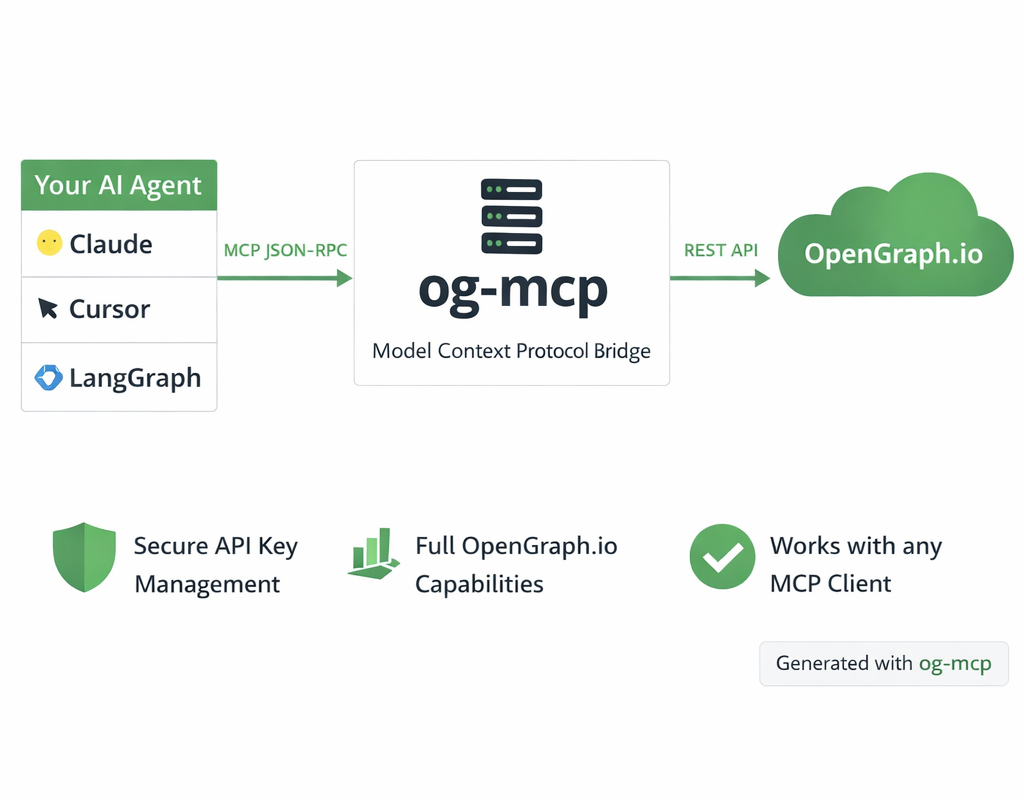 <sup>Diagram generated with og-mcp's image generation tools</sup>
The og-mcp server acts as a bridge between AI clients (like Claude or other LLMs) and the OpenGraph.io API:
This abstraction prevents exposing API keys directly to the AI while providing full access to OpenGraph.io capabilities.
npm install
npm run build
npm start
The server will run on port 3010 by default (configurable via PORT environment variable).
The server requires an OpenGraph.io App ID to function properly. You can provide this in several ways:
OPENGRAPH_APP_ID or APP_ID in a .env file or as an environment variable--app-id YOUR_APP_ID?app_id=YOUR_APP_ID)Example .env file:
OPENGRAPH_APP_ID=your_app_id_here
# or
APP_ID=your_app_id_here
For command-line usage and npm global installation, the server can be run with stdio transport:
npm run start:stdio
You can pass the OpenGraph API key directly via command-line argument:
npm run start:stdio -- --app-id YOUR_APP_ID
When installed globally:
opengraph-io-mcp --app-id YOUR_APP_ID
This mode allows the server to be invoked directly by other applications that use MCP.
This method runs a web server that can be accessed over HTTP and uses SSE for streaming:
npm start
If you prefer running a persistent server instead of stdio:
npm start
Then configure your client to connect to:
http://localhost:3010/sse?app_id=YOUR_OPENGRAPH_APP_ID
Machine endpoints, protocol fit, contract coverage, invocation examples, and guardrails for agent-to-agent use.
Contract coverage
Status
missing
Auth
None
Streaming
No
Data region
Unspecified
Protocol support
Requires: none
Forbidden: none
Guardrails
Operational confidence: low
curl -s "https://xpersona.co/api/v1/agents/mcp-securecoders-opengraph-io-mcp/snapshot"
curl -s "https://xpersona.co/api/v1/agents/mcp-securecoders-opengraph-io-mcp/contract"
curl -s "https://xpersona.co/api/v1/agents/mcp-securecoders-opengraph-io-mcp/trust"
Trust and runtime signals, benchmark suites, failure patterns, and practical risk constraints.
Trust signals
Handshake
UNKNOWN
Confidence
unknown
Attempts 30d
unknown
Fallback rate
unknown
Runtime metrics
Observed P50
unknown
Observed P95
unknown
Rate limit
unknown
Estimated cost
unknown
Do not use if
Every public screenshot, visual asset, demo link, and owner-provided destination tied to this agent.
Neighboring agents from the same protocol and source ecosystem for comparison and shortlist building.
Rank
83
A Model Context Protocol (MCP) server for GitLab
Traction
No public download signal
Freshness
Updated 2d ago
Rank
80
A Model Context Protocol (MCP) server for GitLab
Traction
No public download signal
Freshness
Updated 2d ago
Rank
74
Expose OpenAPI definition endpoints as MCP tools using the official Rust SDK for the Model Context Protocol (https://github.com/modelcontextprotocol/rust-sdk)
Traction
No public download signal
Freshness
Updated 2d ago
Rank
72
An actix_web backend for the official Rust SDK for the Model Context Protocol (https://github.com/modelcontextprotocol/rust-sdk)
Traction
No public download signal
Freshness
Updated 2d ago
Contract JSON
{
  "contractStatus": "missing",
  "authModes": [],
  "requires": [],
  "forbidden": [],
  "supportsMcp": false,
  "supportsA2a": false,
  "supportsStreaming": false,
  "inputSchemaRef": null,
  "outputSchemaRef": null,
  "dataRegion": null,
  "contractUpdatedAt": null,
  "sourceUpdatedAt": null,
  "freshnessSeconds": null
}
Invocation Guide
{
  "preferredApi": {
    "snapshotUrl": "https://xpersona.co/api/v1/agents/mcp-securecoders-opengraph-io-mcp/snapshot",
    "contractUrl": "https://xpersona.co/api/v1/agents/mcp-securecoders-opengraph-io-mcp/contract",
    "trustUrl": "https://xpersona.co/api/v1/agents/mcp-securecoders-opengraph-io-mcp/trust"
  },
  "curlExamples": [
    "curl -s \"https://xpersona.co/api/v1/agents/mcp-securecoders-opengraph-io-mcp/snapshot\"",
    "curl -s \"https://xpersona.co/api/v1/agents/mcp-securecoders-opengraph-io-mcp/contract\"",
    "curl -s \"https://xpersona.co/api/v1/agents/mcp-securecoders-opengraph-io-mcp/trust\""
  ],
  "jsonRequestTemplate": {
    "query": "summarize this repo",
    "constraints": {
      "maxLatencyMs": 2000,
      "protocolPreference": [
        "MCP"
      ]
    }
  },
  "jsonResponseTemplate": {
    "ok": true,
    "result": {
      "summary": "...",
      "confidence": 0.9
    },
    "meta": {
      "source": "GITHUB_MCP",
      "generatedAt": "2026-04-17T03:21:45.425Z"
    }
  },
  "retryPolicy": {
    "maxAttempts": 3,
    "backoffMs": [
      500,
      1500,
      3500
    ],
    "retryableConditions": [
      "HTTP_429",
      "HTTP_503",
      "NETWORK_TIMEOUT"
    ]
  }
}
Trust JSON
{
  "status": "unavailable",
  "handshakeStatus": "UNKNOWN",
  "verificationFreshnessHours": null,
  "reputationScore": null,
  "p95LatencyMs": null,
  "successRate30d": null,
  "fallbackRate": null,
  "attempts30d": null,
  "trustUpdatedAt": null,
  "trustConfidence": "unknown",
  "sourceUpdatedAt": null,
  "freshnessSeconds": null
}
Capability Matrix
{
  "rows": [
    {
      "key": "MCP",
      "type": "protocol",
      "support": "unknown",
      "confidenceSource": "profile",
      "notes": "Listed on profile"
    },
    {
      "key": "mcp",
      "type": "capability",
      "support": "supported",
      "confidenceSource": "profile",
      "notes": "Declared in agent profile metadata"
    },
    {
      "key": "model-context-protocol",
      "type": "capability",
      "support": "supported",
      "confidenceSource": "profile",
      "notes": "Declared in agent profile metadata"
    },
    {
      "key": "opengraph",
      "type": "capability",
      "support": "supported",
      "confidenceSource": "profile",
      "notes": "Declared in agent profile metadata"
    },
    {
      "key": "web-scraping",
      "type": "capability",
      "support": "supported",
      "confidenceSource": "profile",
      "notes": "Declared in agent profile metadata"
    },
    {
      "key": "screenshots",
      "type": "capability",
      "support": "supported",
      "confidenceSource": "profile",
      "notes": "Declared in agent profile metadata"
    },
    {
      "key": "link-preview",
      "type": "capability",
      "support": "supported",
      "confidenceSource": "profile",
      "notes": "Declared in agent profile metadata"
    },
    {
      "key": "claude",
      "type": "capability",
      "support": "supported",
      "confidenceSource": "profile",
      "notes": "Declared in agent profile metadata"
    },
    {
      "key": "cursor",
      "type": "capability",
      "support": "supported",
      "confidenceSource": "profile",
      "notes": "Declared in agent profile metadata"
    },
    {
      "key": "cli",
      "type": "capability",
      "support": "supported",
      "confidenceSource": "profile",
      "notes": "Declared in agent profile metadata"
    }
  ],
  "flattenedTokens": "protocol:MCP|unknown|profile capability:mcp|supported|profile capability:model-context-protocol|supported|profile capability:opengraph|supported|profile capability:web-scraping|supported|profile capability:screenshots|supported|profile capability:link-preview|supported|profile capability:claude|supported|profile capability:cursor|supported|profile capability:cli|supported|profile"
}
Facts JSON
[
  {
    "factKey": "docs_crawl",
    "category": "integration",
    "label": "Crawlable docs",
    "value": "6 indexed pages on the official domain",
    "href": "https://github.com/login?return_to=https%3A%2F%2Fgithub.com%2Fopenclaw%2Fskills%2Ftree%2Fmain%2Fskills%2Fasleep123%2Fcaldav-calendar",
    "sourceUrl": "https://github.com/login?return_to=https%3A%2F%2Fgithub.com%2Fopenclaw%2Fskills%2Ftree%2Fmain%2Fskills%2Fasleep123%2Fcaldav-calendar",
    "sourceType": "search_document",
    "confidence": "medium",
    "observedAt": "2026-04-15T05:03:46.393Z",
    "isPublic": true
  },
  {
    "factKey": "vendor",
    "category": "vendor",
    "label": "Vendor",
    "value": "Securecoders",
    "href": "https://github.com/securecoders/opengraph-io-mcp",
    "sourceUrl": "https://github.com/securecoders/opengraph-io-mcp",
    "sourceType": "profile",
    "confidence": "medium",
    "observedAt": "2026-02-25T03:21:03.885Z",
    "isPublic": true
  },
  {
    "factKey": "protocols",
    "category": "compatibility",
    "label": "Protocol compatibility",
    "value": "MCP",
    "href": "https://xpersona.co/api/v1/agents/mcp-securecoders-opengraph-io-mcp/contract",
    "sourceUrl": "https://xpersona.co/api/v1/agents/mcp-securecoders-opengraph-io-mcp/contract",
    "sourceType": "contract",
    "confidence": "medium",
    "observedAt": "2026-02-25T03:21:03.885Z",
    "isPublic": true
  },
  {
    "factKey": "traction",
    "category": "adoption",
    "label": "Adoption signal",
    "value": "1 GitHub stars",
    "href": "https://github.com/securecoders/opengraph-io-mcp",
    "sourceUrl": "https://github.com/securecoders/opengraph-io-mcp",
    "sourceType": "profile",
    "confidence": "medium",
    "observedAt": "2026-02-25T03:21:03.885Z",
    "isPublic": true
  },
  {
    "factKey": "handshake_status",
    "category": "security",
    "label": "Handshake status",
    "value": "UNKNOWN",
    "href": "https://xpersona.co/api/v1/agents/mcp-securecoders-opengraph-io-mcp/trust",
    "sourceUrl": "https://xpersona.co/api/v1/agents/mcp-securecoders-opengraph-io-mcp/trust",
    "sourceType": "trust",
    "confidence": "medium",
    "observedAt": null,
    "isPublic": true
  }
]
Change Events JSON
[
  {
    "eventType": "docs_update",
    "title": "Docs refreshed: Sign in to GitHub · GitHub",
    "description": "Fresh crawlable documentation was indexed for the official domain.",
    "href": "https://github.com/login?return_to=https%3A%2F%2Fgithub.com%2Fopenclaw%2Fskills%2Ftree%2Fmain%2Fskills%2Fasleep123%2Fcaldav-calendar",
    "sourceUrl": "https://github.com/login?return_to=https%3A%2F%2Fgithub.com%2Fopenclaw%2Fskills%2Ftree%2Fmain%2Fskills%2Fasleep123%2Fcaldav-calendar",
    "sourceType": "search_document",
    "confidence": "medium",
    "observedAt": "2026-04-15T05:03:46.393Z",
    "isPublic": true
  }
]
Sponsored
Ads related to opengraph-io-mcp and adjacent AI workflows.